Docs › Your money
Your wallet
What each number and button on the Wallet page means, and why the wallet belongs to you, not to us.
Think of your wallet as a personal safe that only you can open. FightBets shows you what's inside and helps you use it. Your Cash is yours, and we're never the other side of your bet. The only balances FightBets holds for you are promotional credit and the FightBets Cash card some accounts see.
Open it any time from Wallet.
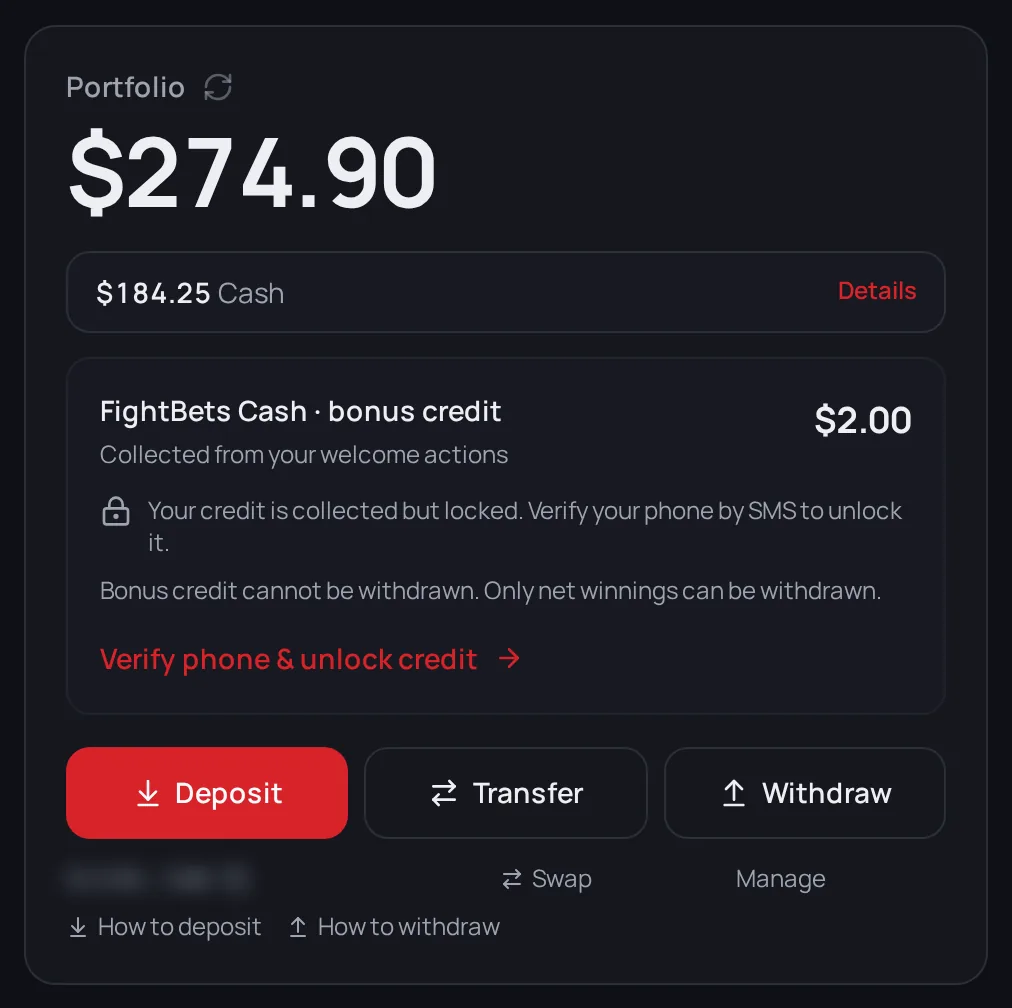
The numbers at the top
Portfolio
The big number is everything you have: your Cash plus what your open bets are worth right now. Under it, the "past day" line shows how much that total went up or down in the last 24 hours. Money you added or took out doesn't count as a gain or a loss there.
Cash
The Cash row is the money you can use right now. It's in USDC, a digital dollar: 1 USDC is worth $1. Your Cash is:
- money you added and haven't bet yet,
- money back from bets you sold,
- winnings you already claimed.
Cash is what you bet with, and it's what you can withdraw.
Note: A won bet reaches Cash once it's claimed. When you have one, a Winnings ready to claim card shows at the top of this page with a Claim all button. If you signed in with email, Google or a passkey, it's usually claimed for you when you open the page. See Claiming winnings.
Details
Sometimes a Details link shows up next to Cash. It means your wallet holds money that needs one tap before you can bet with it, like a different kind of USDC, USDT, or funds on Ethereum. Open Details and tap Convert. Adding funds explains why this happens.
Promotional credit is not money
Under Cash you'll see a FightBets Cash · bonus credit card. That's promotional credit from your welcome actions. It isn't Cash:
- You can't withdraw it.
- You can't bet with it yet. It's saved to your account.
- It stays locked until you verify your phone by SMS. Until then, the card shows Verify phone & unlock credit.
Learn more in Welcome rewards.
The buttons
- Deposit adds money. See Adding funds.
- Withdraw sends money out of FightBets to an address you choose. See Withdrawing.
- Transfer: you don't need it to bet on fights. The same goes for the plain FightBets Cash card some accounts see (it isn't your promotional credit).
Under the buttons, How to deposit and How to withdraw open step-by-step guides for your country.
Your bets, below
Three tabs sit under the balance:
- Positions: your open bets and won bets waiting to be claimed.
- Open: orders still waiting to be filled. It's usually empty.
- History: everything you've done.
If a number looks wrong
The page refreshes itself every few seconds while it's open. You can also tap the refresh arrow next to Portfolio. If the balance won't load, you'll see "Couldn't load your balance — your funds are safe. Tap refresh." That's a display problem, not missing money.
Next
Ready to add money? Go to Adding funds.