Docs › Betting
Placing a bet
How the bet slip works, the $1 minimum, and what "shares" and "To win" mean before you tap Bet.
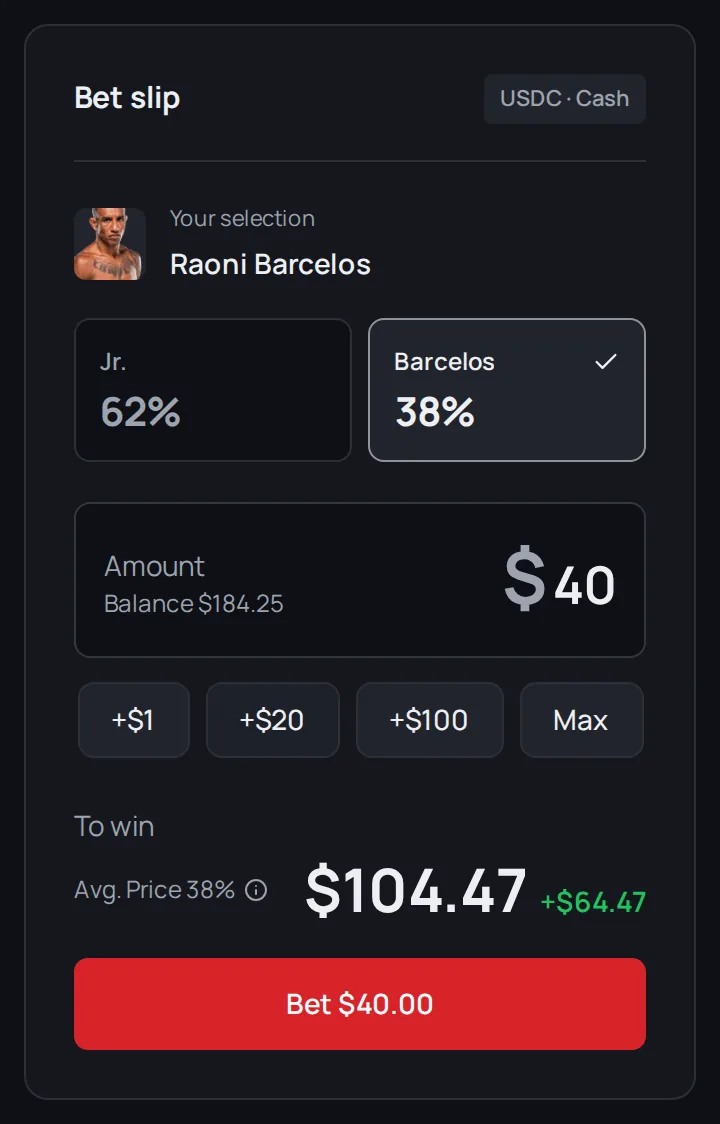
Every bet goes through a bet slip. There are two versions:
- On a computer, the full bet slip sits on the right of the fight page.
- On a phone, tap a fighter's portrait or percentage and a quick slip slides up. The same quick slip opens on any screen when you tap a percentage on Fights.
Place a bet
- Pick your fighter. Tap their name. Your pick is highlighted, with their current percentage.
- Enter an amount. Type it, or tap +$1, +$20 or +$100 to add to it. Max fills in the most your balance can cover, with a little kept back for the trading fee.
- Check what you'd win. The payout line appears as soon as you enter an amount (see below).
- Tap Bet $X. You'll see "Placing bet..." and then Bet placed!
The limits
- Minimum bet: $1. Below that, the button reads Min bet $1.
- Keep a little extra. The trading fee is paid on top of your bet, from the same balance, so a $1 bet needs about $1.05 available.
- Maximum: $10,000. That's the most the slip lets you enter for one bet.
Shares and "To win"
Your money buys shares in your fighter. Each share pays $1 if they win. The number of shares is roughly your bet divided by the price: $20 at 40% buys about 50 shares.
Below the amount, the slip shows:
- To win (quick slip: Potential payout): the total you'd get back if your fighter wins, $1 for each share. This includes your original bet.
- The +$X next to it (quick slip: Net win): your profit. That's the payout minus your bet and minus the trading fee.
- Avg. Price (full slip only): the average price per share your bet would get right now. See Reading the odds.
Both slips work these out the same way, so the same bet shows the same numbers on a computer and on a phone. FightBets charges no fee of its own. The market charges a small trading fee, paid on top of your bet: your whole amount buys shares. See Fees.
These are estimates at the current price. The price can move between when you look and when your bet goes through.
When the slip stops you
- Insufficient balance. You typed more than you have. Tap Add funds to go to your Wallet.
- Low liquidity warning. Not many people are betting on this fight, so a big bet would get a worse price. The slip suggests a smaller amount. If the price would be more than about 5% worse, the full slip blocks the bet and shows Enable low-liquidity bets in Settings. To go ahead anyway, switch on Allow low-liquidity betting in Settings, on the Preferences tab. The quick slip changes its button to Bet anyway instead and shows the extra cost.
- Not enough liquidity. There isn't enough on offer to fill your bet at all. Try a smaller amount. The setting above doesn't change this.
- Cash betting is not available for this fight yet. The market hasn't opened.
- Betting on this fight is closed (quick slip: This fight is over — betting is closed.). The market has ended.
- Betting is not available in your region. See Where you can play.
Note: Promotional credit from welcome rewards is not cash, and you can't bet with it yet. Only your Cash balance can be used in the slip.
After you bet
Your position shows in your Wallet under Positions. On a computer, it also shows on the fight page under "Your position on" your fighter. See My bets.
Next
Changed your mind before the fight? Read Cashing out early.