Docs › Community
Chat
One shared chat for every FightBets fan. What you can post, the house rules, and how to report a message.
Chat is one big room where fans talk fights. Everyone is in the same conversation. Anyone can read it. Sign in to post.
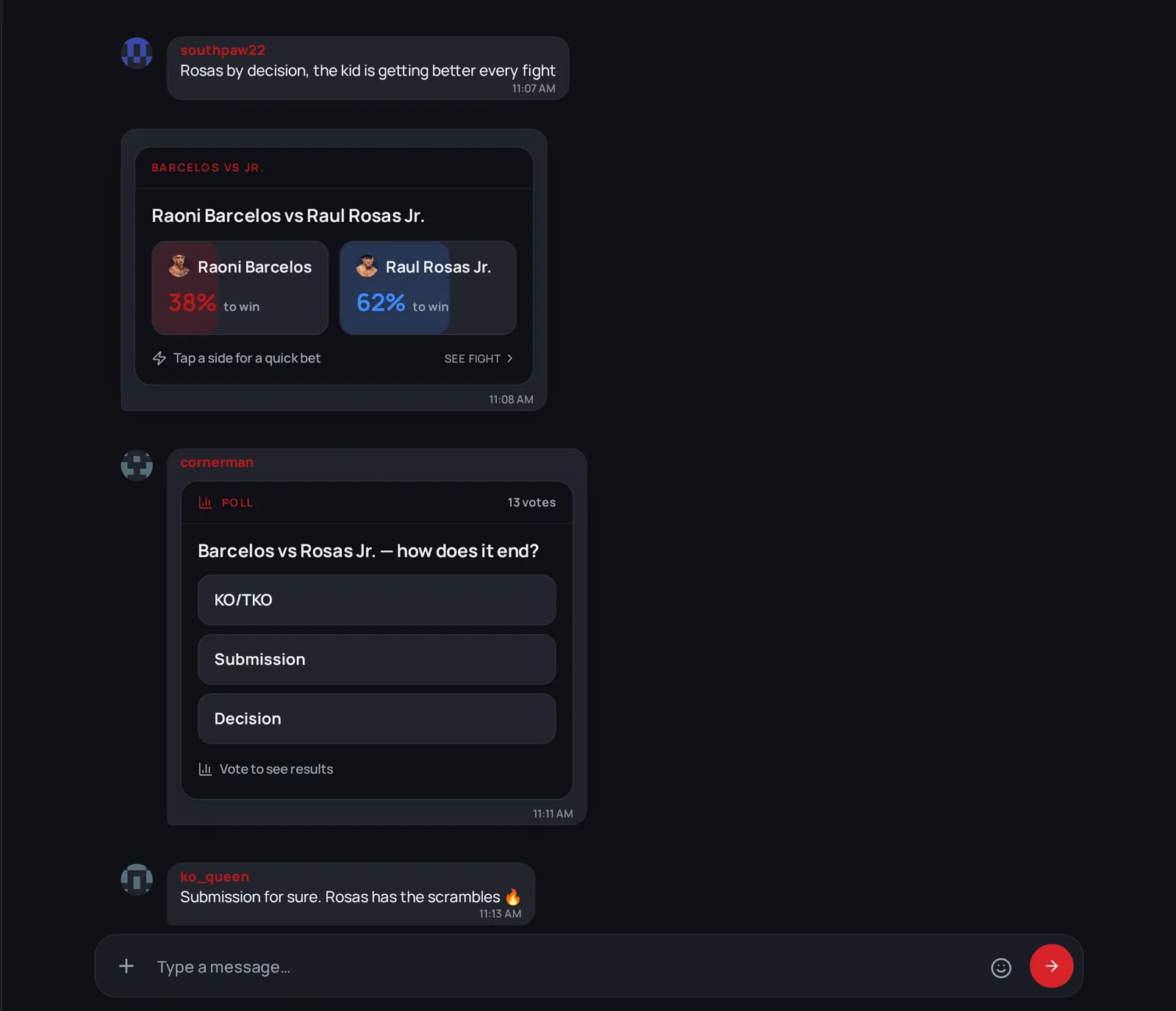
What you can post
Type in the box at the bottom and tap send. Tap + (Add to chat) for more, or type / to open the command list.
| What | How | Limits |
|---|---|---|
| A message | Type and send | Up to 2,000 characters |
| A photo | + → Upload media, or paste an image | Up to 5 MB. Bigger photos are shrunk for you; GIFs over 5 MB are refused. |
| A video | + → Upload media | MP4 or WEBM, up to 95 MB |
| A fight | /bet (Share a fight) |
Posts a fight card other fans can tap to bet |
| A poll | /poll |
A question and 2 to 5 options |
| A question for FightBets | /ask, or start with @fightbets |
The assistant answers in the chat |
You can also:
- Mention someone with
@and their username. Suggestions pop up as you type. - Reply to a message so your answer quotes it.
- React with one of six emojis: ❤️ 🔥 💀 😂 🥊 💯
- Edit your own message for 10 minutes after posting, and delete it any time.
Your bets show up in the chat
When you place a bet, a short line can appear in the feed for everyone to see: your username, the fight and the amount. Several bets in a row are grouped so they don't flood the room. You'll see other fans' bets the same way.
Send cash to another fan
Open the menu (⋯) on someone's message and choose Send cash to send money from your wallet straight to theirs.
Warning: Money you send goes directly to the other person's wallet. Double-check the name before you confirm, and never send money to someone because a chat message asked you to.
House rules
- Be decent. No harassment, abuse or slurs. The chat blocks abusive messages.
- No spam or promos. Messages pushing token giveaways, "DM me" offers, other groups or channels, trading signals or deposit bonuses are blocked.
- Slow down. You can send up to 5 messages every 20 seconds. Go faster and you'll be asked to slow down.
- One account per person. Our Terms don't allow multiple accounts.
Report a message
- Open the menu (⋯) on the message.
- Tap Report.
- You'll see "Report submitted". Our team reviews it.
You can report each message once.
If you can't post
Sometimes a notice replaces the message box and says why. For example, chat isn't available in some regions, and it's turned off for some flagged accounts. If you think it's a mistake, contact support.
Next
Keep your account safe: Security.