Docs › Your money
Adding funds
Put money in your wallet with a card, from a crypto exchange, or from another wallet, and fix a deposit that shows up in the wrong form.
To bet, you need Cash in your wallet. Cash is USDC, a digital dollar worth $1 each. Open Wallet and tap Deposit. You get two options.
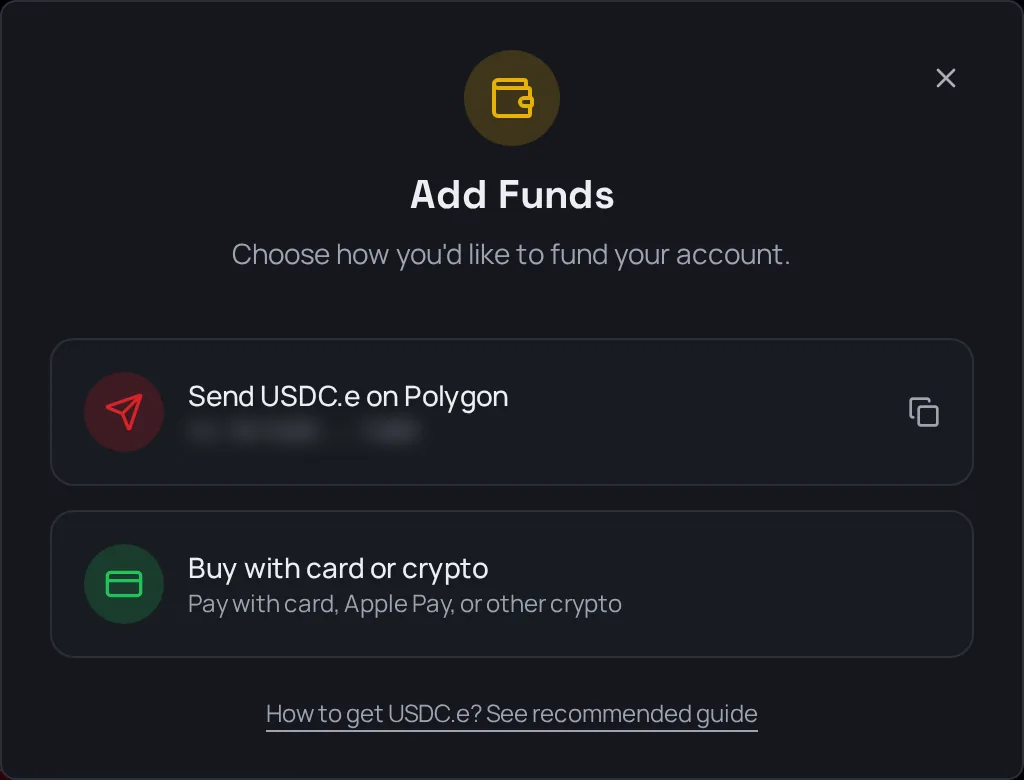
Option 1: Buy with card or crypto
Best if you've never used crypto.
- Tap Deposit, then Buy with card or crypto.
- Pick an amount.
- Pay by card, Apple Pay, or with crypto you already have.
The money arrives straight in your wallet. The payment options you see depend on your country. The payment provider shows you the price before you pay.
Option 2: Send from an exchange or another wallet
Use this if you already have USDC on an exchange like Coinbase, Kraken, Binance or Revolut.
- Tap Deposit. The first option copies your deposit address.
- On your exchange, choose to withdraw or send USDC.
- Pick the Polygon network. The deposit screen names it too. This step matters most.
- Paste your address and send.
Not sure how your exchange works? Tap How to deposit under the Wallet buttons. It picks your country and walks you through the exchanges that work there, step by step. It also shows your address as a QR code you can scan.
Warning: Send USDC on the Polygon network, and nothing else. FightBets can't see money sent on another network, and you may lose it for good.
"My deposit arrived, but I can't bet with it"
Most exchanges send a version of USDC that needs one extra step before you can bet with it. When that happens, a Details link shows up next to Cash on your Wallet.
- Tap Details. It lists the money that needs converting, with a Convert button.
- Tap Convert. The conversion runs on its own, and you can keep using the app while it works.
- When it's done, the money shows up in your Cash.
If you try to bet before converting, the bet slip may show a yellow banner that starts with "$X in USDC". Tapping it converts too. Keep the screen open until it finishes.
The same goes for:
- USDT sent on the Polygon network: open Details next to Cash and tap Convert.
- USDC or USDT on Ethereum: open Details and tap Convert to move it over. Ethereum charges its own network fees, so it's cheaper to send on Polygon from the start.
If a convert from Details fails, the app opens a swap screen so you can finish by hand.
Signed in with your own wallet?
If you logged in with MetaMask, Rabby or another wallet you already had, that wallet is your FightBets wallet. Whatever is in it is already there. Don't send from it to your own deposit address: nothing moves, and you still pay a network fee.
In a country where betting isn't offered?
You can still deposit and look around, but you can't place real-money bets. See Where you can play.
Next
Money in? Place your first bet with Your first bet.