Docs › Help
Troubleshooting
Quick fixes for the problems fans hit most, from a deposit that hasn't shown up to a win that didn't reach your balance.
Most problems have a quick fix. Find yours below. If it's still stuck after the steps, contact support.
Money and deposits
My deposit hasn't arrived
- Open your Wallet and refresh the page.
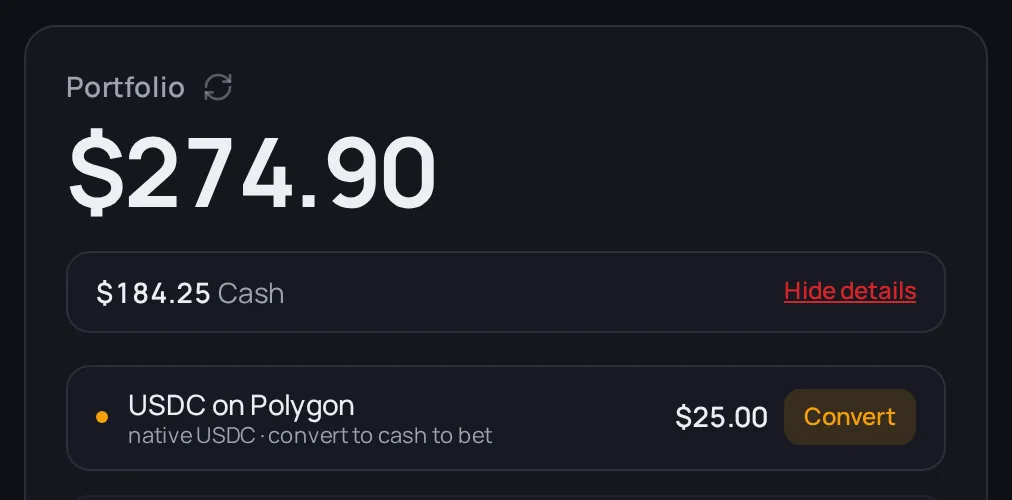
- If a Details link shows next to Cash, tap it and look for a Convert button (see the next question). Your money may have arrived in a form that needs converting.
- Check that you sent it to the address shown in your Wallet, on the network the How to deposit guide tells you to use.
If you see Couldn't load your balance — your funds are safe. Tap refresh., that's a display problem, not missing money. Tap refresh or come back in a minute.
My deposit arrived but I can't bet with it
That's fixable. Your Wallet spots it. Tap Details next to Cash and you'll see it listed with a Convert button. The bet slip may also show a yellow banner that starts with $X in USDC.
- Tap Convert (or the banner).
- Keep the page open until it finishes.
- Your Cash goes up and you're ready to bet.
If the conversion fails, you'll see a message that your funds were not spent. Try again, and contact support if it keeps failing.
I sent money from Ethereum
Your Wallet shows it as On Ethereum, with a button to bring it over so you can bet.
If the app tells you that you need a little ETH on Ethereum first, that's because the network fee on Ethereum is paid in ETH. Send a small amount of ETH to the same wallet address on Ethereum, then tap the button again.
Warning: Always use the network the deposit guide shows. Money sent on a network your Wallet doesn't list may not show up. Contact support with the transaction details if that happens.
Winning and claiming
I won but my balance didn't change
Your win is probably waiting to be claimed. Settled winnings move into your Cash only once they're claimed.
- Open your Dashboard or Wallet.
- Look for the Winnings ready to claim card.
- Tap Claim all and wait for Claimed $X USDC.
You can also claim one bet from the Positions tab in your Wallet: the fight you won shows Claim instead of Sell. If the market settles without a winner (a draw, for example), every share on both sides pays 50¢ and also shows Claim.
In your History, a win reads Won until it's claimed, then Claimed. See Claiming winnings.
My claim failed
- The claim did not go through on-chain. Your winnings are still there — try again. Nothing was lost. Tap Claim all or Claim again.
- Redemption failed with A previous redeem is still confirming: wait about 30 seconds and tap Claim again.
- A claim is already running: another claim is in progress. Wait a moment and refresh.
For any other error, try once more, then contact support.
Betting
My bet didn't go through
Read the message on screen. It usually tells you exactly what to do.
| You see | What to do |
|---|---|
| The odds moved while you were betting | Refresh the fight page and try again. |
| Minimum order is $1 | Bet at least $1. |
| Almost there — cash bets need $1 plus a small fee | You need at least $1.05 available. Add funds and try again. |
| Not enough balance for this bet | Add funds or lower your bet. |
| This market has no available liquidity right now | Try another fight, or come back later. |
| Betting on this market is closed | The market has closed. Pick another fight. |
| A previous transaction is still confirming | Wait about 30 seconds, then try again. |
| Betting is at full capacity right now | Nothing was charged. Try again in a few minutes. |
| That took too long to confirm | It may still be going through. Check your Wallet before you bet again. |
| Your session expired | Refresh the page and sign in again. |
Tip: If the message ends with a code like (ref 7F2K9Q), send that code to support. It points us straight to what happened.
Did my bet go through twice?
Before you retry a bet that timed out, open your Wallet and check Positions and History. If you see That bet is already going through, wait a few seconds and refresh.
Signing in
My login code never came
- Check your spam, junk and promotions folders.
- Make sure the email address is typed right. Tap Use a different email to fix it.
- Wait a minute, then tap Resend code.
- Still nothing? Try again later, or contact support.
If you see Your OTP code is invalid or expired, ask for a new code and use the newest one.
Warning: Sign in the same way you signed up. If you created your account with an email code, don't switch to Google or a wallet to get in. A different method can open a different, empty wallet. See Security.
I signed in and my money is gone
Almost always, you signed in with a different method or email than last time. Log out and sign in exactly the way you did when you created the account.
Location
Cash betting isn't available in my country
If the bet slip says Betting is not available in your region, real-money betting is off where you're connecting from. You can still deposit, withdraw and browse. See Where you can play.
If you think it's wrong, refresh the page to check again.
The slip says "We couldn't check your location."
The location check didn't get an answer, often because of a shaky connection. The app already tried again on its own. Betting stays off until the check works.
- Tap Retry next to the message.
- Still stuck? Refresh the page, or try another connection.
- If it keeps failing, contact support.
Next
Not sure what a word means? See the Glossary.